 aion2.fyi
Settings and performance
Targeting, controls, camera, sound, graphics and ping
Sections
Control style
Press / to switch between the two control styles:
| Mode | How it plays | Best for |
|---|---|---|
| AION 2 mode | Keyboard moves, mouse turns the camera, crosshair targets. Hold Alt for the cursor | Damage dealers: fast macros and positioning |
| AION 1 mode | Click to move and target | Healers watching party frames |
Put your macro on a mouse button (right button or a side button) so your left hand stays on movement. Sprint is also your dodge (it has invulnerability frames), so bind it where your thumb is.
Targeting
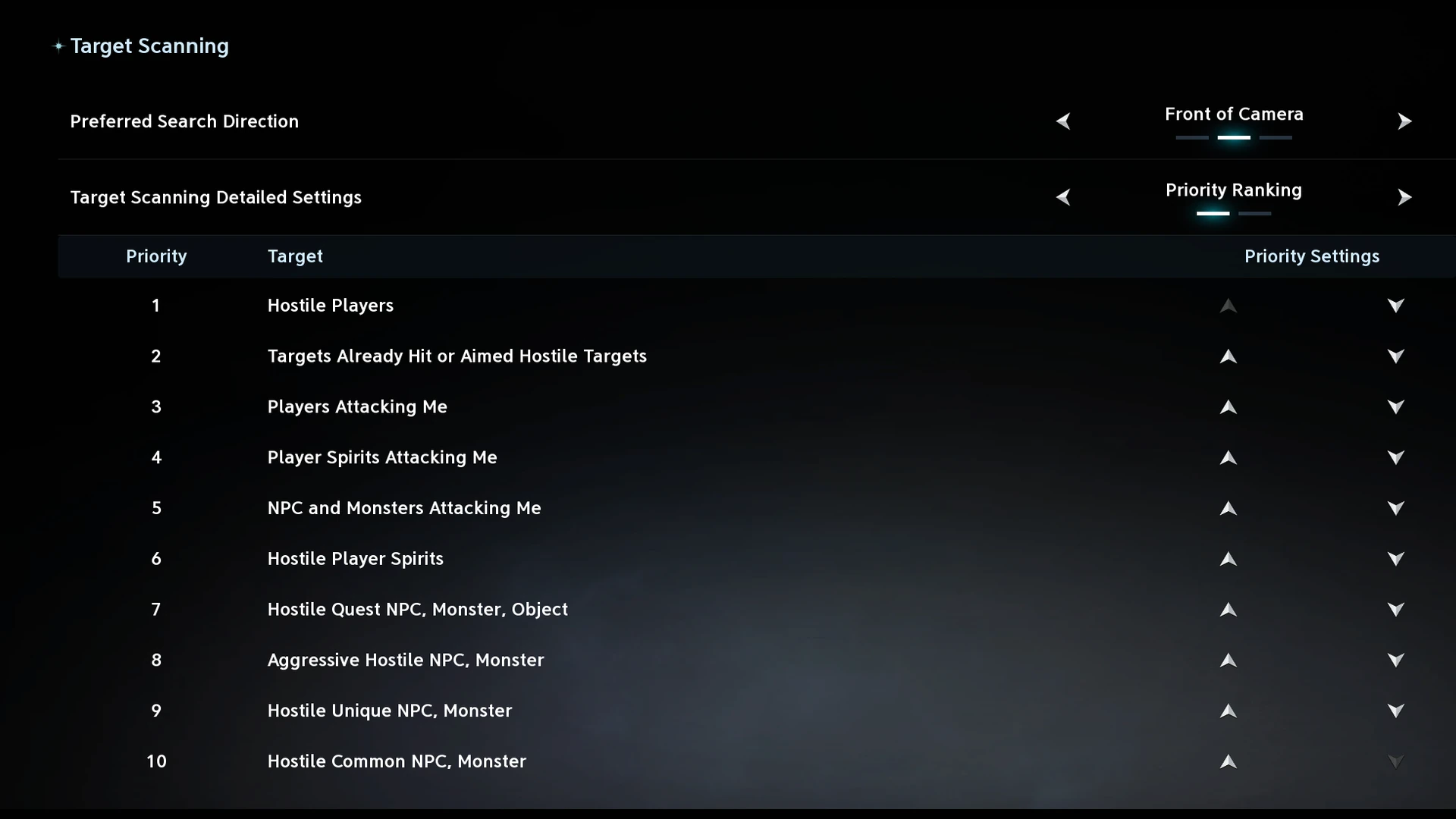
Everything here is under Settings > Battle > Target Scanning. The default Tab picks the closest enemy wherever you look and puts targets you already hit first, which feels random in a pack or in the Abyss.
| Setting | Set it to |
|---|---|
| Preferred Search Direction | Front of Camera (every guide we checked agrees). Front of Character if you turn the character more than the camera |
| Target Scanning Detailed Settings | Priority Ranking |
| Search range | Default for melee. Ranged classes can go to 40 or 50 m |
The full priority order (ten entries, moved with the arrows)
| # | Entry | Why |
|---|---|---|
| 1 | Hostile Players | Tab always takes a player over a mob |
| 2 | Players Attacking Me | Whoever is hitting you now |
| 3 | Targets Already Hit or Aimed Hostile Targets | Stay on what you were killing (the default puts this first) |
| 4 | NPC and Monsters Attacking Me | Clear what's on you before pulling more |
| 5 | Hostile Unique NPC, Monster | Elites and bosses before trash |
| 6 | Aggressive Hostile NPC, Monster | Mobs that will aggro anyway |
| 7 | Hostile Quest NPC, Monster, Object | Quest targets |
| 8 | Hostile Common NPC, Monster | Everything else |
| 9 | Hostile Player Spirits | A Tab press on a Spiritmaster spirit is wasted |
| 10 | Player Spirits Attacking Me | Same reason |
Some PvP players swap 2 and 3 so Tab never leaves the player they're bursting.
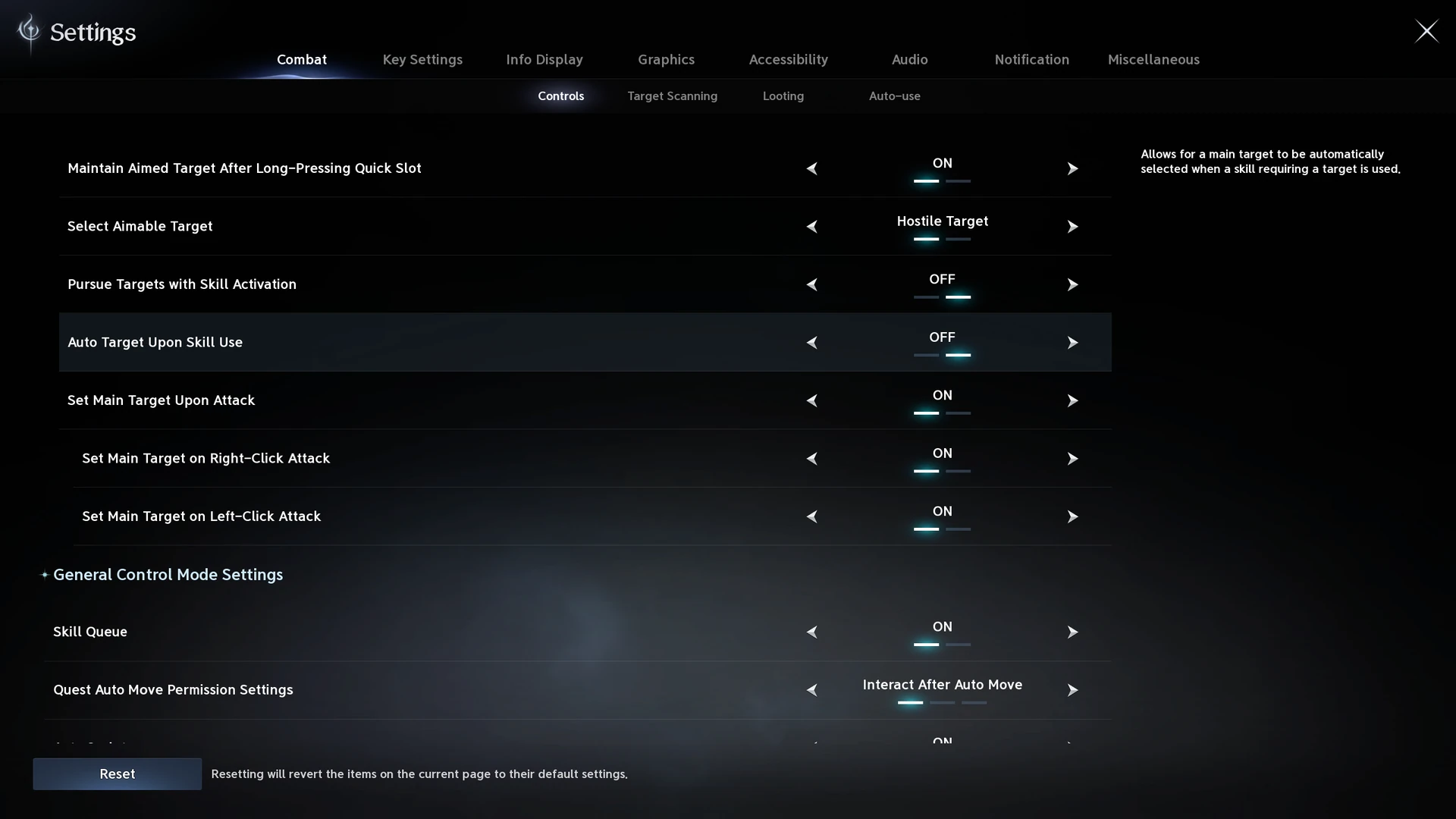
How skills pick targets (Battle > Controls)
| Option | What it does | Pick |
|---|---|---|
| Pursue Targets with Skill Activation | Out of range, you run to the target | Off (every source) |
| Auto Target Upon Skill Use | With no target, a skill picks one | Sources disagree: on for open-world farming, off for bosses and PvP |
| Set the Auto Target when there is a Hit Target | What your skill hits becomes the target | On |
| Set Main Target on Left/Right-Click Attack | Clicking a target makes it the main one | On for your macro's mouse button |
| Camera Lock-On to Target | The camera follows your target | Personal. Many melee players leave it off for back attacks |
Camera, display and sound
- Camera distance at max and field of view 100+, to see adds and markers behind you.
- Camera shake and motion blur off. Shake hides cast bars.
- Boss facing indicator on (Information Display > Combat), for positional classes.
- Teleport Effect Color: dark. The default flashes white on every teleport.
- Hide other players' damage numbers. Keep only your own. Less CPU load, clearer boss markers.
- Sound: music down, skill effects and voices up. Many bosses call out a big unmarked attack a second or two early. Hidden Cubes make a sound you can hear from far away with effects up.
- Auto-use consumables "only in combat" so they aren't spent while traveling.
Graphics and FPS
First find what's holding you back. Watch Task Manager or MSI Afterburner in a fight:
| What you see | Cause | Change |
|---|---|---|
| GPU at 95 to 100% | Resolution and effects | Upscaling on Quality or Balanced, lower shadows and reflections |
| GPU at 50 to 60%, CPU maxed | Too many players to draw | Lower Player Density, Identical Player Appearance on, shorter character render distance |
| Setting | Value |
|---|---|
| Upscaling (DLSS / FSR) | Quality or Balanced (about 20 to 40% more FPS) |
| Shadows | Low or Medium |
| Reflections, water | Low |
| Effects | Medium (attack markers stay readable) |
| Player Density | Low in the Abyss and raids |
| Identical Player Appearance | On for big fights. The client says it "greatly improves performance in large-scale battles" |
| Player Particle Effect Display | Self Only, or Self and Party, at field bosses |
| View distance | Medium |
Ping and your PC
| When | Damage lost to high ping |
|---|---|
| August 2026 (KR) | about 50% at 200+ ms (Divium) |
| Since the late September patch | about 5 to 10% at most (Divium) |
Kanon's later tests still found 150 to 200 ms more ping costing a lot of damage on fast classes, because ping eats Combat Speed. So it still matters most on fast attackers.
| Class | Ping it wants |
|---|---|
| Assassin | under 50 ms |
| Gladiator | under 50 ms |
| Templar, Chanter, Ranger, Brawler | 50 to 80 ms is fine |
| Sorcerer, Cleric | under 100 ms is fine |
| Spiritmaster | least affected: the spirits attack on their own |
- Wired, not Wi-Fi. Packet loss is damage loss.
- Divium's PC advice: 32 GB RAM, a 6+ core CPU (Intel 13th gen or Ryzen 5000 and newer), Reflex and DLSS on.
- Paid ping boosters sponsor many videos, so we don't use their claims.
Sources
We wrote this guide from these creators' videos and pages and checked what we could against the game.
- FrozenCloud, Essential Aion 2 Settings You NEED To Change Right Now (Oct 9, 2026)
- DrybearGamers, STOP Playing AION 2 With the Default Settings — Fix These NOW! (Oct 1, 2026)
- FRESHY, Dramatically Increase Your FPS With These Optimized Settings in AION 2 | Ultimate FPS Guide (Oct 5, 2026)
- Divium Furor, Aion 2 Guide for ULTIMATE POWER (UGLY TRUTH) (Aug 16, 2026)
- Divium Furor, I Played Aion for 2000 Hours, so you don't have too... (Sep 25, 2026)
- Game8, best settings
- Mobalytics, best settings
- couga54, settings guide